· Sales data · 3 min read
Waterfall Enrichment in Claude Code with an MCP Server
Waterfall enrichment is how you get accurate, affordable B2B data. Which MCP servers run waterfalls, how to connect one to Claude Code, and how to change the provider order.

›In this post · 5 sections
Waterfall enrichment is one of the core strategies for getting accurate, affordable B2B data: ask providers in order until one has the answer. Read "What Is Waterfall Enrichment?" to learn more about the idea.
Which MCP servers run waterfalls
Most enrichment MCP servers wrap one provider: Hunter, LeadMagic, Crustdata, Apollo. They're useful, but when the provider has no answer, the agent hits a dead end.
The solution is to add a B2B waterfall MCP server to your agent. A waterfall finds more than any single provider:
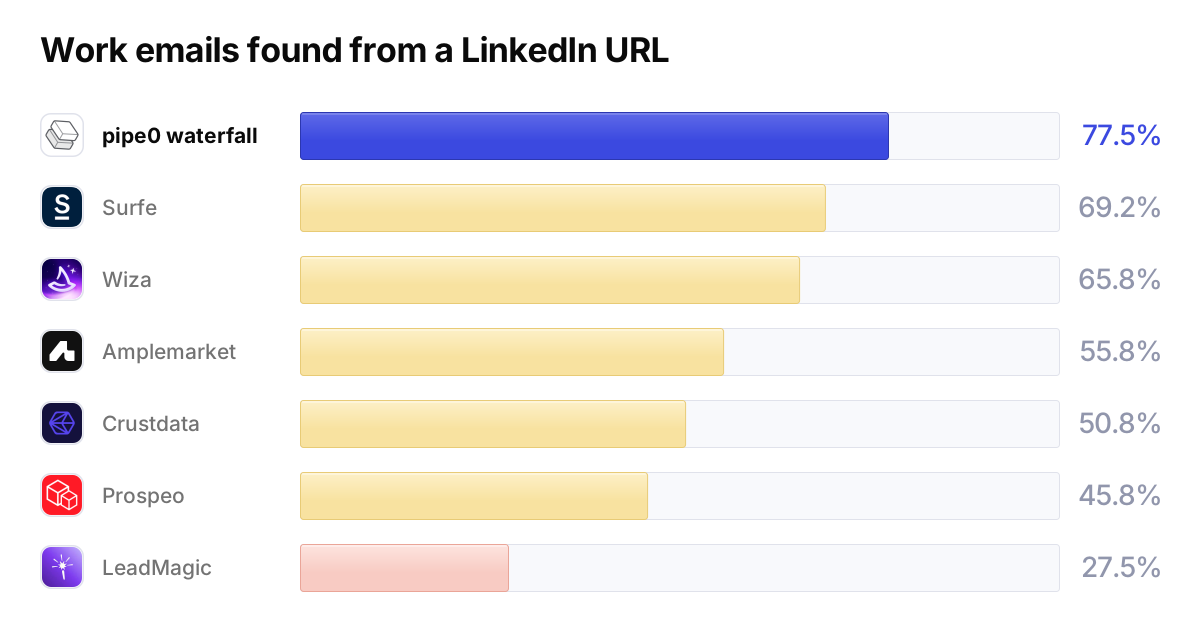
Waterfall MCP servers:
- pipe0 has waterfall pipes for work emails, personal emails, mobile numbers, and company data, over providers like Wiza, Amplemarket, Crustdata, Surfe, Hunter, and LeadMagic, in an order you choose.
- FullEnrich has an official MCP server over its email and phone waterfall.
- Clay runs waterfalls inside Clay tables, so an agent can trigger them but not build them.
- BetterContact runs an email and phone waterfall, but has no official MCP server; you'd connect it through a third party like Zapier.
Single-provider MCP servers, useful as one step in a chain:
- Surfe has the highest coverage of any single provider above, with an official MCP server in beta.
- Prospeo, LeadMagic, Crustdata, and Apollo all have official MCP servers.
- Wiza and Hunter have no official MCP server, but both run inside pipe0's waterfalls.
For the wider picture, see the best MCP servers for GTM engineers.
Set it up
The example uses pipe0. Add the server from your terminal:
claude mcp add --transport http pipe0 https://api.pipe0.com/v1/mcpThen run /mcp inside Claude Code, select pipe0, and choose Authenticate.
A browser window opens for sign-in; there's no API key to paste.
Run a waterfall
Ask for what you need:
Find work emails for these 8 LinkedIn profiles. Only keep emails that
pass validation.
The agent looks up the right pipe, person:workemail:profileurl:waterfall@1,
and sends the profiles in one call. Before it spends anything, it asks you
to confirm. Each person comes back with a work email or a clear "no
result", which is an answer, not an error: every provider in the chain was
asked and none had it. Misses cost nothing.
The same request works outside Claude Code too:
import { Pipe0 } from "@pipe0/client";

const pipe0 = new Pipe0({ apiKey: process.env.PIPE0_API_KEY });

const result = await pipe0.pipes.pipe({
  pipes: [
    {
      pipe_id: "person:workemail:profileurl:waterfall@1",
    },
  ],
  input: [
    {
      id: "1",
      profile_url: "https://www.linkedin.com/in/jane-doe",
    },
  ],
});
console.log(result);
import requests
response = requests.post(
"https://api.pipe0.com/v1/pipes/run/sync",
headers={"Authorization": f"Bearer {API_KEY}"},
json={
"pipes": [
{
"pipe_id": "person:workemail:profileurl:waterfall@1",
},
],
"input": [
{
"id": "1",
"profile_url": "https://www.linkedin.com/in/jane-doe",
},
],
},
)
print(response.json())curl -X POST "https://api.pipe0.com/v1/pipes/run/sync" \
-H "Authorization: Bearer $API_KEY" \
-H "Content-Type: application/json" \
-d '{
"pipes": [
{
"pipe_id": "person:workemail:profileurl:waterfall@1"
}
],
"input": [
{
"id": "1",
"profile_url": "https://www.linkedin.com/in/jane-doe"
}
]
}'Change the provider order
The waterfall's default order is Wiza, Amplemarket, Crustdata, then Surfe. If you trust a different provider for your market, say so:
Run the same waterfall, but ask Amplemarket first and skip Wiza.The agent passes a providers list in the pipe's config, and the server
asks them in that order. Hunter, Findymail, and LeadMagic can join the
chain too.
From chat to something that keeps running
A one-off run in chat is a good start. When the list matters, ask the agent to put it in a sheet, then to refresh it on a schedule. It's the same engine, so nothing gets rebuilt along the way. If you're new to the pipe0 MCP server, this walkthrough builds a full prospect list from one prompt.
Frequently asked questions
How do I set up waterfall enrichment in Claude Code?
Add an MCP server that runs waterfalls server-side. Run `claude mcp add --transport http pipe0 https://api.pipe0.com/v1/mcp`, run /mcp to sign in, and ask Claude Code for the data you need. The agent picks the best waterfall to fulfill your request.
Which MCP servers support waterfall enrichment?
Most enrichment MCP servers wrap a single provider. pipe0 and FullEnrich run waterfalls behind an official MCP server. Clay runs waterfalls inside Clay tables, and BetterContact has no official MCP server. Surfe, Prospeo, LeadMagic, Crustdata, and Apollo offer single-provider MCP servers.
Can I change the order of providers in the waterfall?
Yes, with pipe0. Each waterfall pipe takes a providers list in its config, so you can tell the agent which providers to ask and in what order, or drop one entirely.

 Try pipe0