

Billing
Our billing system consists of two parts: credits and subscriptions.
Credits
Credits are the universal currency of pipe0. Requests in production mode are billed in credits.
Every new organization starts with 20 free credits. After that, you can buy credits one-off
(see one-off purchases) or subscribe to a plan that refills your balance every month.
Whether an errored operation bills depends on its billing mode:
onSuccess operations, which cover most enrichment pipes, never bill on errors or empty results.
Credits let you make requests to third-party services without purchasing subscriptions to these services.
You can find the credit costs per operation in the pipe catalog and search catalog.
What a run cost
Every pipes and search response carries a credits object, except the create response of POST /v1/pipes/run
and POST /v1/search/run, where nothing has run yet. credits.spent is what the run has consumed so far,
summed across every billed operation in it. Read it once from the sync response, or poll check while the run is processing to watch spend accumulate.
{
  "id": "xgvxuqk2771d8t17n60vphu9",
  "status": "completed",
  "credits": { "spent": 0.5 }
  // ...
}
See the pipes response object and the search response object for the full shape.
Pipe billing
Pipes are billed when they "run".
Pipes "run" when at least one of their output fields will be generated. If all output fields are provided by your input data, the pipe does not "run" unless at least one provided output value requires regeneration. See input sanitation for more info.
Pipes can "run" without consuming credits. This is determined by their billing mode.
Billing mode
Billing is defined per billable operation, not per pipe. Most pipes carry a single operation, a waterfall
pipe carries one per provider, and agent:run@1 stacks token operations and tool-call operations. Each
operation has a mode, always or onSuccess, that determines when it costs credits. The catalog shows
the mode for every pipe.
Mode always
The operation bills on every attempt, regardless of outcome. Credits are deducted even when the output
fields are marked no_result. Failed calls are not billed. See field status for more info.
Mode onSuccess
The operation bills only when it produces a result: at least one output field marked completed.
Errors and no_result cost nothing. Waterfall providers use this mode, which is why a waterfall
only bills the provider that returned the value.
See field status for more info.
AI pipe billing
AI pipes like prompt:run@1, email:write@1, and message:write@1 are billed by token usage,
not at a flat price per run.
- Input and output tokens are billed separately, in blocks of 100 tokens.
- Each model tier (
google-low,openai-high,anthropic-high) has its own credit price per block. agent:run@1bills the tokens of every agent step, plus a fee per tool call.
Short prompts with short answers cost a fraction of a credit. Long prompts over large fields (for example a full profile object) cost more. The pipe catalog shows a cost estimate for every AI pipe.
Search billing
Searches are billed per result, per page, or per search. The search catalog lists the mode and cost for every search.
Mode per_result
You are billed per search result. If a search request returned 500 entries you are billed 500 times
the cost per result.
Mode per_page
You are billed once per page of results you fetch, regardless of how many entries the page contains.
Mode per_search
You are billed once per search, regardless of how many entries it returns.
Insufficient balance
If your credit balance is insufficient to complete an ongoing enrichment task, the entire task fails and you are billed for the enrichment performed up to the failure.
One-off purchases
You can buy credits at any time, with or without a subscription. Go to "Dashboard" > "Billing" and click "Buy credits", enter an amount between $10 and $5,000, and pay through Stripe. Credits land in your balance within seconds of returning to the dashboard, and the receipt is available from the billing portal.
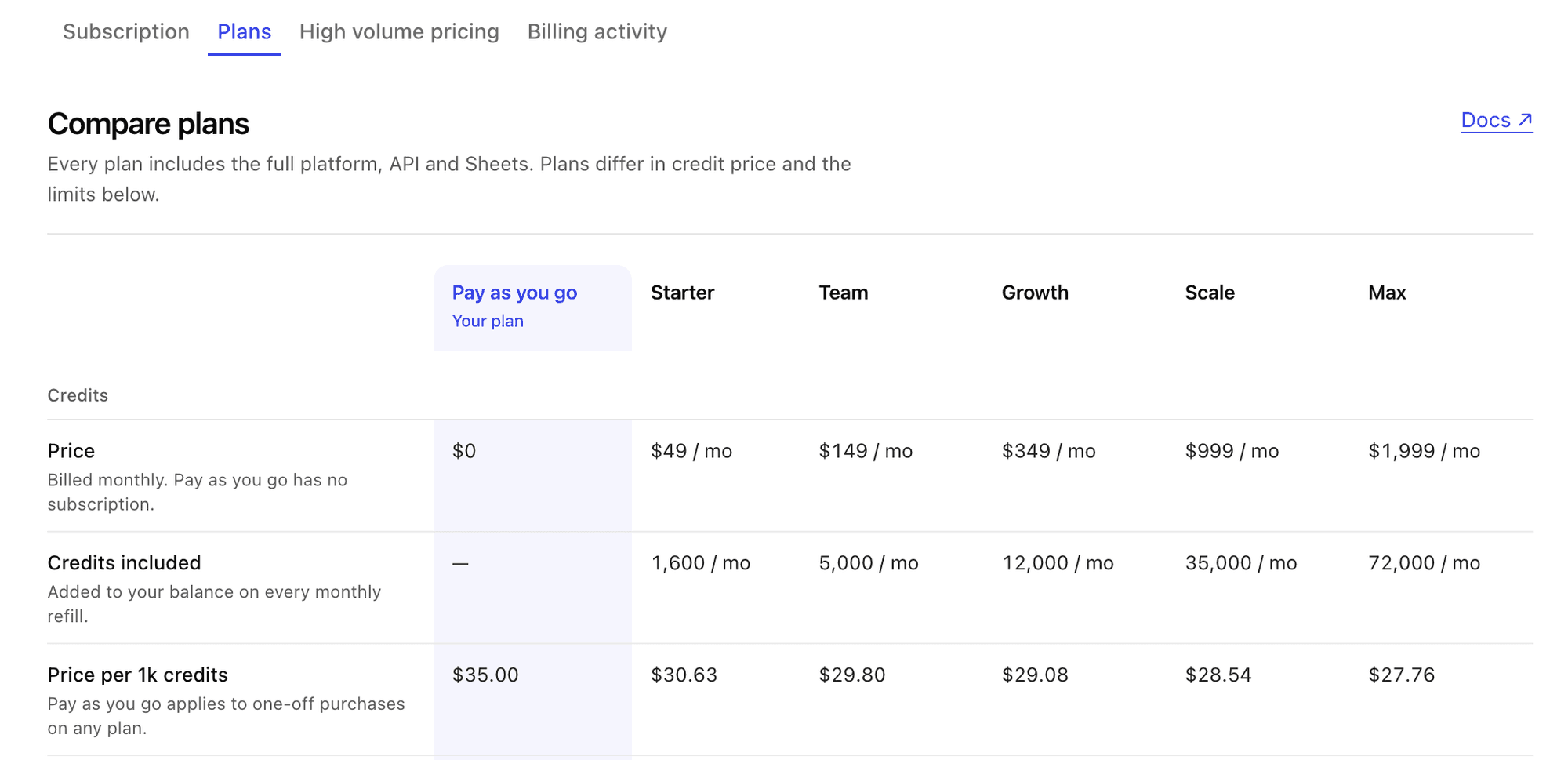
One-off credits cost $0.035 per credit ($35 per 1,000 credits), about 15% more than credits included in a subscription. They never expire and are not subject to the credit rollover cap.
When you spend credits, subscription credits are used first and purchased credits last.
Credit rollover
You can hold up to 3x the monthly credit amount of your subscription in your account. When a refill would push your balance past this threshold, the excess is lost. Credits you bought outright do not count toward this threshold and are never lost to it.
During subscription downgrades the credit rollover amount is lowered and the limit of your new subscription applies.
Negative balances
We do not offer negative balances (line of credit).
If you're building a system that requires auto-top-ups to remain operational at all times, contact support@pipe0.com.
High-usage billing
High-usage billing lowers the per-operation credit price of high-traffic pipes and searches. You enroll an eligible operation into a discount tier in "Dashboard" > "Billing" > "High volume pricing", and every run of that operation bills at the lower price from then on.
Enrollment is a dashboard setting only. You don't need API calls, request parameters, or code changes: your existing pipes, searches, and sheets pick up the lower price automatically.
In the pipe catalog and search catalog, eligible operations show a "high volume from" price next to their standard cost. Open the price to see the full tier breakdown.
What qualifies
High-usage billing only changes the price of operations that run on a managed connection, where pipe0 supplies the provider key. Operations on your own connection are billed separately and never use tiers.
An operation qualifies when its standard price is at least 0.1 credits and the catalog lists discount tiers for it. Near-free operations do not qualify.
One operation can sit behind several pipes and searches. When you enroll it, every pipe and search that bills under that operation gets the lower price.
Tiers
An eligible operation has up to three tiers: level 1, level 2, and level 3. Each level is cheaper than the one before it, so level 3 gives the lowest price. The catalog cost table lists the exact price for each level.
Capacity and slots
Each paid plan includes a high-volume capacity, a fixed number of slots you can spend across all your enrollments. A deeper tier costs more slots. If an enrollment would push you past your capacity, pipe0 rejects the change. To free up slots, move an enrollment to a lower tier or remove it. See plan limits for the slots on each plan.
30-day lock
Each enrollment is locked for 30 days from the day you set it. While it is locked you can move up to a cheaper tier if you have the capacity, but you cannot move down or unenroll. Changing the tier starts the 30 days again.
Custom discount levels
We're open to adding custom discounts for customers committing to higher volumes. Reach out to support@pipe0.com.
Subscriptions
Subscriptions are managed through Stripe.
Plan limits
Every plan includes the full platform, API, and Sheets. Plans differ in credit price and in these limits:
- Monthly credits and the credit rollover cap
- Number of schedules
- Number of buckets
- Records you can queue through the API at full priority
- High-volume billing slots
Go to "Dashboard" > "Billing" > "Plans" to compare every plan side by side. The table shows the exact numbers for each plan, highlights your current plan, and is always up to date. The "Compare plan limits" link on the "Subscription" tab opens it too.
You can create, update, and cancel your subscription at any time. Navigate to "Dashboard" > "Billing" > "Manage Subscriptions" to access the billing portal.
Support
For issues and questions regarding your subscription, contact support@pipe0.com.